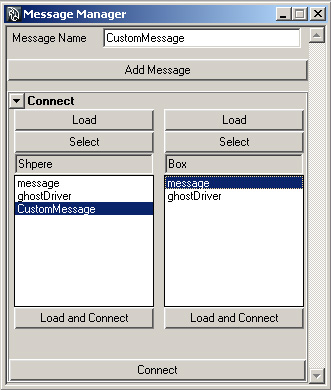
 The Message Manager provides an easy way of adding and connecting message attributes in Maya. Messages are useful because they will always point to the objects they are connected to, even when the name of that object changes. This trait is particularly useful when dealing with namespaces, as any script attempting to access an object by name will stop working when a namespace is added to that object.
At the top of the tool is a section devoted to adding message attributes to objects. Enter the desired attribute name and press the button to add that message attribute to any selected objects. Under the connect tab is an area where the user can load up all message attributes of two objects, and then connect them as desired.
Future Work: My main concern at the moment is that the tool doesn't take into account the direction of the message when connecting two attributes. Once a message attribute has an outgoing or incoming connection, Maya will not allow connections in the opposite direction to be made. This is only important when actually making the connection, as they can be queried from either object afterwards. I plan to address this in the future when I add this tool to a larger rigging toolset.
Download: Download the current version of the Message Manager here.